| I l@ve RuBoard |
|
AppDomain EventsThe AppDomain type supports a handful of events that allow interested parties to be notified of significant conditions in a running program. Table 8.1 lists these events. Four of these events are related to the assembly resolver and loader. Three of these events are related to terminal conditions in the process. DomainUnload is called just prior to the unloading of an AppDomain. ProcessExit is called just prior to the termination of the CLR in a process. UnhandledException acts as the last-chance exception handler to deal with threads that do not handle their own exceptions. The runtime eventually handles unhandled exceptions. If the thread that caused the exception to be raised does not have a corresponding exception handler on the stack, then the CLR invokes its own global exception handler. This global exception handler is a last chance for the application to recover from the error. It is not good design to rely on the global exception handler, if for no other reason than the offending thread is long gone and very little execution scope may be left to recover.
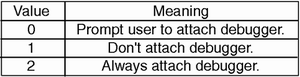
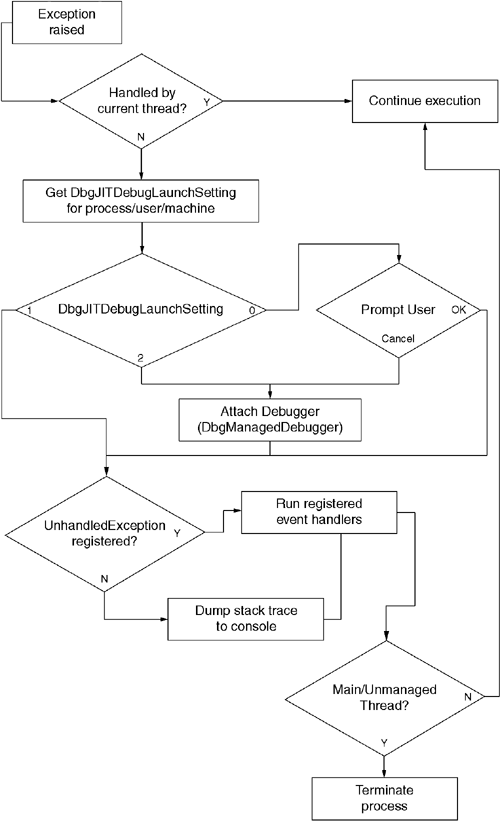
The CLR's global exception handler first checks a configuration setting to see whether a debugger needs to be attached. One can make this setting on a per-process, per-user, and per-machine basis. Under Windows NT, the CLR picks up the per-process setting from a process-wide environment variable (COMPLUS_DbgJITDebugLaunchSetting). For per-user and per-machine settings, the CLR reads the value from a registry key. As shown in Figure 8.4, the value of DbgJITDebugLaunchSetting is either 0, 1, or 2. If the DbgJITDebugLaunchSetting is 1, then the CLR will not attach a debugger. If the DbgJITDebugLaunchSetting is 2, then the CLR attaches the JIT debugger. The CLR reads the exact debugger that will be used from the registry. By default, the DbgManagedDebugger registry value points to VS7JIT.EXE, which starts by giving the user the choice of debuggers to use. Figure 8.5 shows the initial prompt of VS7JIT.EXE. If the DbgJITDebugLaunchSetting is 0, then the CLR will prompt the user to find out whether a debugger should be attached. Figure 8.6 shows this dialog box. If the user selects Cancel, then processing continues as if DbgJITDebugLaunchSetting were 2. If the user selects OK, then processing continues as if DbgJITDebugLaunchSetting were 1. Figure 8.4. Configuring JIT Debugging for Unhandled Exceptions
Figure 8.5. DbgManagedDebugger/VS7JIT.EXE
Figure 8.6. Dialog Box Presented If DbgJitDebugLaunchSetting = 0
After the user has indicated the decision about attaching a debugger, the CLR then checks to see whether the application has registered an UnhandledException event handler. The exception handler must be registered from the default domain, which is the initial domain created by the CLR. Registering the event handler from child domains will have no effect. Listing 8.4 shows the use of an UnhandledException event handler. The CLR will run our handler prior to terminating the process. Had no UnhandledException event handler been registered, then the stack dump from the exception would be printed to the console. Figure 8.7 shows the overall process of unhandled exception processing. Figure 8.7. Unhandled Exception Sequence
Listing 8.4 Registering an Unhandled Exception Event Handler
using System;

class BadApp {
// this method is our handler
  static void AppHurts(Object sender,
                       UnhandledExceptionEventArgs args) {
    Exception offender = args.ExceptionObject;
    if (args.IsTerminating)
      CleanUpBeforeDying();
  }
  static void Main() {
// this registers the handler for the entire process
    AppDomain.CurrentDomain.UnhandledException +=
              new UnhandledExceptionEventHandler(AppHurts);

    int x = 3 / 0; // causes exception
  }
}
There are four AppDomain events related to assembly resolution and loading. One uses one of the events (AssemblyLoad) to notify interested parties when a new assembly has successfully been loaded. The assembly resolver uses the other three of these events when it cannot resolve a type (TypeResolve), assembly (AssemblyResolve), or manifest resource (ResourceResolve). For these three events, the CLR gives the event handler the opportunity to produce a System.Reflection.Assembly object that can be used to satisfy the request. It is important to note that the resolver calls these three methods only after it has gone through its standard techniques for finding the desired assembly. These events are useful primarily for implementing an application-specific "last-chance" assembly resolver that uses some app-specific policy for converting the requested AssemblyName into a codebase that can be passed to Assembly.LoadFrom. Listing 8.5 shows an example that uses the AssemblyResolve event to supply a backup policy for finding assemblies. In this example, the CLR munges the simple name of the requested assembly into an absolute pathname into the windows\system32 directory. After the new pathname is constructed, the event handler uses the Assembly.LoadFrom method to pass control to the low-level loader. Listing 8.5 Retro-Programming in C#
using System;
using System.Reflection;

class oldhack {
  static oldhack() {
// register the event handler at type-init time
    AppDomain.CurrentDomain.AssemblyResolve +=
                       new ResolveEventHandler(Backstop);
  }
// here is the event handler
  static Assembly Backstop(object sender,
                  ResolveEventArgs args) {
// extract the simple name from the display name
    string displayName = args.Name;
    string simpleName = displayName.Split(',')[0];

// build the retro-file name
    string fullPath = String.Format(
            "C:\\windows\\system32\\{0} .dll", simpleName);

// delegate to LoadFrom
    return Assembly.LoadFrom(fullPath);
  }

  static void Main()  {
    Console.WriteLine(MyCode.GetIt());
  }
}
 |
| I l@ve RuBoard |
|